
Cash In GCash Walkthrough: Step-by-Step Funding & Lag Safeguards
- Refreshing or tapping Submit repeatedly during slow redirects creates duplicate pending orders.
- In-app browsers (Facebook/Messenger) frequently block the GCash app deep-link handoff.
- Depositing below the PHP 100 minimum or via mismatched sender numbers delays crediting.
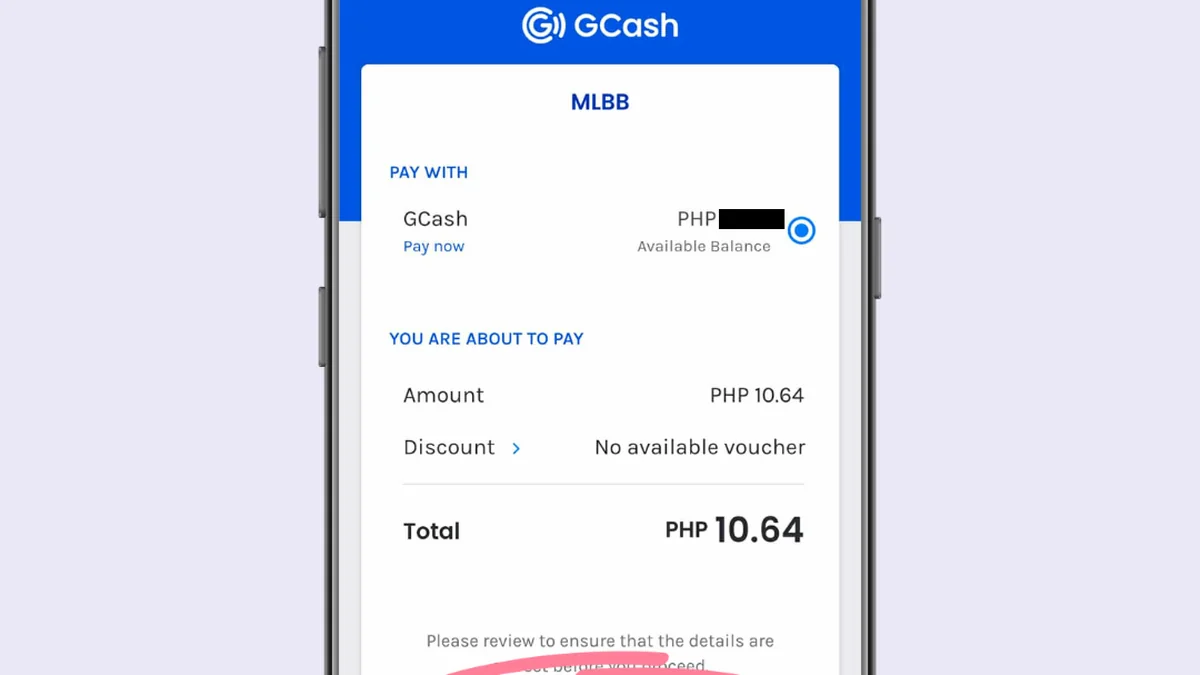
GCash e-wallet mobile transfer screen
Funding an online gaming wallet with GCash is straightforward once your account is Fully Verified, yet tiny browser quirks—especially launching links inside Messenger or double-tapping slow submit buttons—cause most missing-credit complaints.
Follow this exact five-step cash-in routine and learn what to do immediately if GCash deducts money before the lobby refreshes.
| Symptom | Root Cause | Correct Action | What NOT to Do |
|---|---|---|---|
| Button Won't Open GCash | Messenger/FB WebView blocking intent | Switch to Chrome or Safari | Do not type MPIN into pop-up clones |
| Money Deducted, Balance 0 | 2–5 min webhook sync lag | Wait 5 min + save 13-digit Ref # | NEVER send a second deposit |
| Transaction Declined | Basic tier or PHP 100k cap hit | Check GCash Wallet Limits | Do not switch to friend's wallet |
Why Should You Wait 5 Minutes Before Retrying Any Slow GCash Deposit?
Payment gateway callbacks between GCash and gaming servers normally clear in 1 to 3 minutes, stretching to 5 minutes during 15th/30th payday surges. Resending PHP 100 immediately doubles your financial exposure unnecessarily.
Always inspect GCash Inbox / Activity first; if a 13-digit Reference Number appears, the money left GCash safely and only needs webhook matching.
Why Do Messenger and TikTok In-App Browsers Break GCash Redirects?
Social-app WebViews strip standard Android/iOS deep-link permissions, causing the 2 to 3 second GCash cashier handoff to stall on a blank white page. Always open your portal inside full Google Chrome or Apple Safari.
Follow official GCash's official wallet documentation checkout prompts strictly inside native apps.
How Do QRPh Cash-In Codes Work as a Backup?
If direct app redirect stalls, select QRPh inside Cashier, screenshot the single-use QR code, open GCash > QR > Upload QR from Gallery, and confirm the exact merchant amount.
Never reuse an old QR screenshot from a previous deposit—every cashier order generates a unique single-use QR payload.
Step-by-Step GCash Cash-In Checklist
Execute every GCash deposit cleanly in six steps.
- 01Open Chrome or Safari (not social browsers) and sign in on Arionplay Login.
- 02Confirm your GCash balance covers PHP 100+ and monthly limit remains open.
- 03Tap Cashier > Deposit > GCash and pick clean cash (or verified bonus).
- 04Allow the 2–3 second redirect into your native GCash app and approve.
- 05Screenshot the GCash confirmation screen showing the Reference ID.
- 06Wait up to 5 minutes for lobby PHP refresh without tapping back/refresh wildly.
What If Your Deposit Still Doesn't Credit After 10 Minutes?
Open in-lobby Live Chat once and paste your username, PHP amount, timestamp, and GCash Reference ID screenshot so finance reconciles the webhook.
See Arionplay Customer Service for exact ticket prep.
How Long Before You Can Withdraw Deposited Cash?
Anti-money laundering rules require wagering at least 1x of your cash deposit (or full promo turnover if claiming bonuses) before cashing out.
Read withdrawal timing on How To Withdraw Arionplay.
What to Include If a GCash Reference Number Needs Manual Reconciliation
If five minutes pass after GCash deduction without balance refresh, capture the uncropped GCash receipt showing date, exact time, PHP amount, and 13-digit Reference Number before opening live chat.
Providing all four numbers upfront prevents support from asking multiple follow-up questions while finance verifies the gateway webhook.
Why Overnight Maintenance Windows Affect 12:00 AM–3:00 AM Deposits
Local e-wallets and partner banks schedule routine batch updates after midnight; depositing before 11:30 PM or after 5:00 AM ensures instant 1–3 minute lobby credits.
Having an upgraded Maya wallet ready covers unexpected GCash downtime seamlessly.
Avoiding Browser Back-Button Interruptions Mid-Transfer
Leave the GCash confirmation window open until it redirects back cleanly or displays your 13-digit Receipt Reference—closing prematurely can leave orders pending webhook sync.
Using full Chrome or Safari instead of social-app WebViews eliminates nearly all mobile cash-in handoff errors.
Player Protection, 21+ Enforcement, and Responsible Gaming Tools
Unlike age-eighteen thresholds in some overseas jurisdictions, Philippine compliance mandates a strict 21 years old minimum age for every casino, bingo, and sportsbook account.
Treating time alerts and loss stops as built-in gameplay strategy protects your bankroll during high-volatility sessions. Cooling-off rules also delay deposit limit increases by 24 hours so decisions stay deliberate.
Temporary or permanent self-exclusion takes effect within 24 hours and synchronizes across all access points including mobile app installations. Reach out to the National Council on Problem Gambling Philippines, Gamblers Anonymous Philippines, or the PAGCOR Responsible Gaming Helpline whenever neutral advice is needed. Explore support steps inside our Philippine Responsible Gaming Guide.
Final Cautious Assessment & Next Steps
Approaching mobile gaming with a cautious checklist keeps expectations grounded in real math. Start with small PHP 100 test deposits, confirm withdrawal speed before scaling stakes, and keep 21+ responsible gaming boundaries active. Share verified onboarding steps to invite your friends to register and play and get a chance to earn bonuses of up to ₱50,000.00. During active reward cycles, participants additionally get a chance to win up to ₱100,000.00 plus unlock exclusive Mystery Chests subject to published turnover rules.
Frequently Asked Questions
What is the minimum cash-in via GCash?
Most Philippine gaming cashiers start at PHP 100 minimum per GCash deposit.
Why wasn't my GCash cash-in reflected right away?
Wait 5 minutes for gateway sync; if deducted in GCash History, share the Reference ID with official live chat without resending.
Can I reuse a GCash QR code screenshot from yesterday?
No—every deposit creates a fresh single-use QR order; reusing old QR screenshots causes failed credits.
Why did GCash redirect fail inside Facebook browser?
In-app social browsers restrict app handoffs; copy the URL into full Chrome or Safari.
Do I need to wager my deposit before withdrawing?
Yes, standard AML rules require at least 1x turnover on clean deposits before requesting cashouts.